> For the complete documentation index, see [llms.txt](https://docs.notional.finance/exponent/llms.txt). Markdown versions of documentation pages are available by appending `.md` to page URLs; this page is available as [Markdown](https://docs.notional.finance/exponent/smart-contracts/oracle-design-morpho.md).
# Oracle Design (Morpho)
All Notional Exponent Morpho markets list the Notional Exponent vault as its own price oracle.
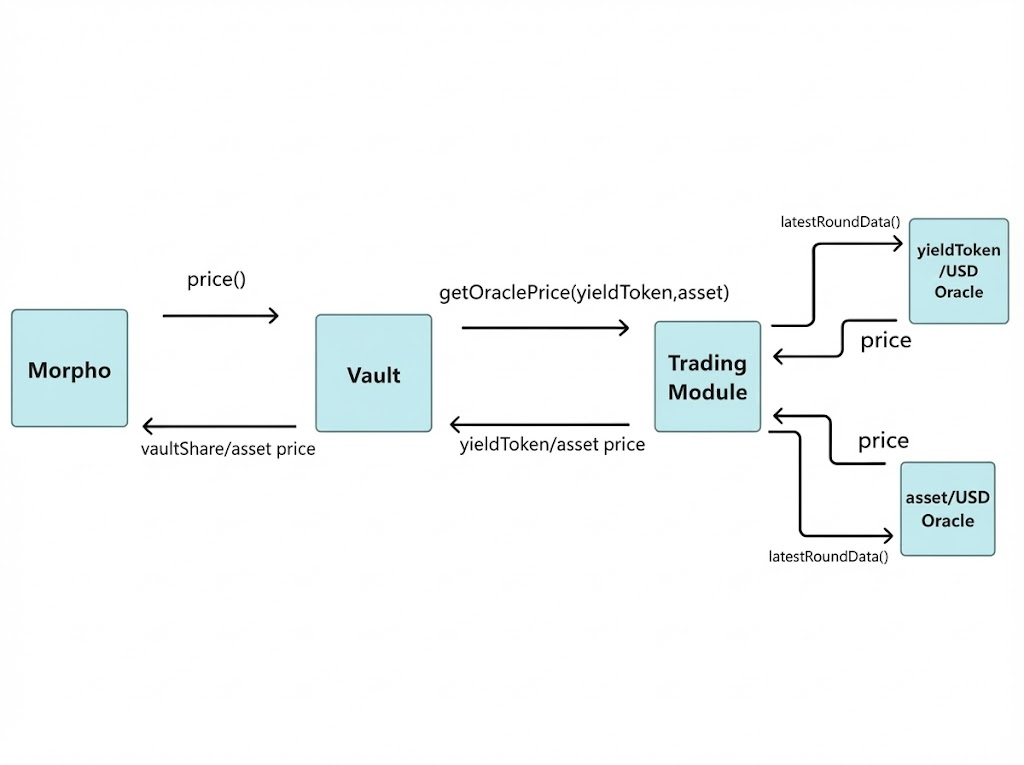
The vault returns the vaultShare price to Morpho by combining the yieldToken/USD and asset/USD exchange rates that come from the oracles listed on the [Trading Module](https://etherscan.io/address/0x594734c7e06C3D483466ADBCe401C6Bd269746C8).
### Step by step method
On [price()](https://github.com/notional-finance/notional-exponent/blob/37154068c19c971c0e72168285aec7922773fc55/src/AbstractYieldStrategy.sol#L135):
1. Vault gets **vaultShare/yieldToken exchange rate**. This slowly decreases over time as Notional accrues fees.
2. Vault gets **yieldToken/asset exchange rate** by calling [getOraclePrice(yieldToken, asset)](https://github.com/notional-finance/leveraged-vaults/blob/7e0abc3e118db0abb20c7521c6f53f1762fdf562/contracts/trading/TradingModule.sol#L262) on the [Trading Module](https://etherscan.io/address/0x594734c7e06C3D483466ADBCe401C6Bd269746C8).
3. Trading Module gets yieldToken/USD exchange rate and asset/USD exchange rate from listed price oracles.
4. Trading Module calculates and returns **yieldToken/asset price**.
5. Vault calculates and returns **vaultShare/asset price**.
### Example calculation
**Set up**
* vaultShare = n-sUSDe
* yieldToken = sUSDe
* asset = USDC
**Step by step**
1. n-sUSDe/sUSDe exchange rate = 0.9999
2. sUSDe/USD exchange rate = 1.2105
3. USDC/USD exchange rate = 0.9978
4. sUSDe/USDC exchange rate = 1.2137
5. n-sUSDe/USDC exchange rate = 1.2136
### Auditing
```solidity
To get the yieldToken/USD and asset/USD oracle contracts:
TradingModule.priceOracles(address yieldToken)
TradingModule.priceOracles(address asset)
```
**Validation**
Morpho’s oracle validation tool will not successfully validate Notional Exponent oracles because they do not follow Morpho’s standard format.
To validate Notional Exponent oracles, make the following checks:
1. Validate the price
1. Call price() on the oracle
2. Compare the result to the price you expect. NOTE - Notional’s vault share price will be slightly lower than the yield token price due to protocol fee accrual
2. Validate the decimals
1. The oracle decimals is equal to (36 + loan token decimals - collateral token decimals)
2. Divide the price() return value by the decimals and check that it is correct